
- Continuous Regulatory Updates: Microsoft regularly releases updated Electronic Reporting (ER) formats for tax, invoicing, and banking compliance.
- Global Repository Access: Connecting to the centralized Microsoft configuration repository directly from the Electronic Reporting workspace.
- Targeted vs. Bulk Import: Strategically importing only relevant format families (e.g. Free Text Invoice) to avoid lengthy 8-10 hour bulk syncs.
- Rebase Mechanics: Upgrading custom derived configurations to adopt new Microsoft baseline versions while preserving customizations.
- Conflict Resolution: Identifying and resolving schema differences using the visual ER rebase conflict resolution designer.

Overview: Global Repository Synchronization
The repository of standard Electronic Reporting (ER) configurations for Dynamics 365 Finance & Operations is continuously updated by Microsoft to reflect evolving statutory and banking standards.
Before customizing any standard business document—such as the Free Text Invoice report—it is crucial to ensure your environment is operating against the latest published baseline version from the Global Repository.
“Rebasing your custom ER configurations against Microsoft’s latest baseline updates ensures legal compliance without having to manually rebuild your custom fields and formulas.”
Connecting to Repository & Importing Objects
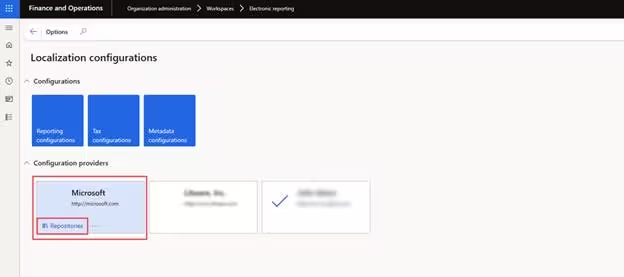
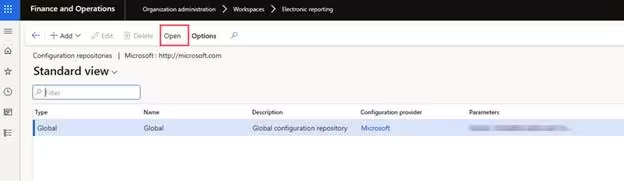
Open Organization administration > Workspaces > Electronic reporting, select the Microsoft configuration provider, and open the Repositories link:
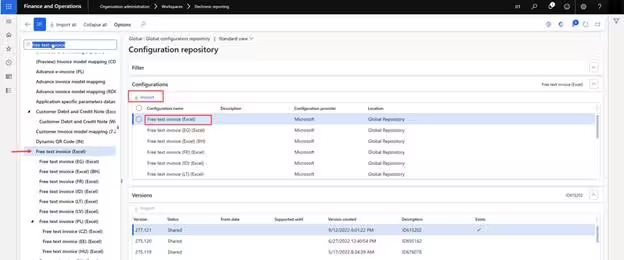
While importing the entire repository is an option, doing so can require 8 to 10 hours of background processing. Instead, select the specific target configuration family (e.g. Invoice model and Free text invoice format) and click Import:
Rebasing Configurations & Conflict Resolution
When Microsoft publishes an updated version of a standard configuration that you have previously customized, you must rebase your derived configuration onto the new baseline.
Rebasing automatically updates the parent version reference while reapplying your custom child nodes, mappings, and formula extensions. If Microsoft altered a field that your custom configuration depends on, a visual conflict indicator appears:
Open the conflict resolution designer to inspect differences side-by-side, accept or merge changes, and save the updated configuration.